Love Game: Crafting Captivating 3D Text for Valentine's Day
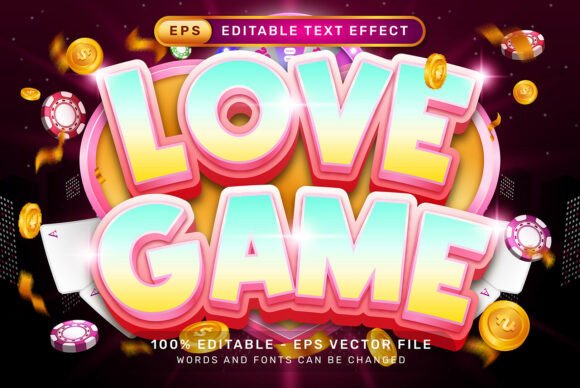
There is a specific kind of energy that surrounds Valentine’s Day marketing. It is a blend of romance, nostalgia, and high-stakes commerce. Whether you are a freelance designer rushing to finish a client’s floral shop branding or a small business owner preparing a social media blitz for February 14th, the visual language you choose determines your success. Flat text often gets lost in the sea of red and pink content. To truly capture attention, you need depth. This is where the Love Game Valentines Day 3D Text Effect enters the conversation. It is not just a font; it is a complete visual system designed to add that necessary pop of dimension and excitement to your typography, turning standard headlines into immersive experiences.
Why Dimension Matters in Modern Branding
We live in a flat design world, but the pendulum is always swinging. Recently, designers have been reintroducing depth, gradients, and shadows to add tactile realism to digital assets. For a holiday centered on emotion and physical tokens like cards and chocolates, this tactile quality is essential. When you use a premium font effect that mimics real-world lighting and depth, you trigger an emotional response. A customer sees a 3D text effect on a poster, and they subconsciously imagine holding a physical object. This is the psychology behind effective packaging design and brand identity.
The Love Game Valentines Day 3D Text Effect leverages this psychology beautifully. It is designed to look playful, bold, and undeniably romantic. But unlike a static image, the beauty of this asset lies in its flexibility. It is built as a vector .EPS file. For the uninitiated, this means the graphics are mathematical equations rather than fixed pixels. You can scale this text to the size of a billboard or shrink it down for a business card, and the 3D effect will remain crisp and high-definition. This scalability is non-negotiable for professional editorial design and logo design.
Unlocking Creative Potential with Editable Effects
One of the biggest pain points for designers and creators is rigidity. You buy a beautiful asset, only to find out you cannot change the text or the colors. That creates more work, not less. The standout feature of this particular design asset is its total editability. It is structured specifically for Adobe Illustrator users, utilizing Graphic Styles.
Imagine you are designing a series of social media graphics for a bakery. You need the words "Love," "Sweet," and "Cake" to all share the same 3D aesthetic. With this file, the workflow is incredibly efficient. You simply select your text, navigate to the Graphic Styles panel, and apply the effect. The software does the heavy lifting, mapping the 3D extrusion and lighting onto your new letterforms instantly.
This ease of use extends to the font choice itself. While the file comes with a preview, you are not locked into that specific typeface. You can apply this effect to a bold sans serif font for a modern, clean look, or apply it to a flowing script font for a more traditional, romantic vibe. This versatility allows you to match the typography perfectly to your project goals. If you are working on a children’s Valentine’s party invitation, you might choose a rounded, bubbly font to pair with the 3D effect. If you are creating high-fashion marketing assets for a jewelry brand, a sharp serif font with this 3D effect creates a luxurious, expensive feel.
Practical Applications for Business Owners and Marketers
Let’s move away from theory and look at the bottom line. How does a design asset like the Love Game Valentines Day 3D Text Effect actually help your business? It boils down to visual consistency and professional presentation.
Small business owners often struggle to compete with larger brands that have dedicated design teams. Using high-quality, ready-made assets levels the playing field. Here are specific ways you can leverage this 3D text effect immediately:
- Website Banners and Hero Images: The web is visual. A striking 3D headline on your homepage captures attention instantly. Because the file is high-resolution (7000 x 4000 px), it looks stunning on 4K monitors and retina screens.
- Merchandise and Printables: If you sell t-shirts, mugs, or greeting cards, this effect allows you to create artwork that looks ready for production. The vector nature ensures that screen printers and DTG (Direct to Garment) printers get clean lines.
- Digital Products: If you are a creator selling digital planners or wall art, adding a 3D title page elevates the perceived value of your product. It signals to the buyer that you care about quality.
- Video Thumbnails: YouTube and TikTok are crowded. A bold, 3D text effect makes your video thumbnail "pop" in a sea of flat images, potentially increasing your click-through rate.
Streamlining Your Design Workflow
Time is money, especially for freelancers and entrepreneurs. The technical setup of this asset is designed to save you hours of work. Creating a 3D text effect from scratch in Illustrator involves complex steps: extruding, rotating, shading, and mapping art. It can take an hour to get it right for one word.
This package eliminates that learning curve. The "What’s inside?" list is short and sweet for a reason: efficiency. You get the VECTOR .EPS file for editing and a .jpg preview for reference. There are no complicated plugins to install or Actions to run that might crash your software. It relies on native Illustrator features.
Furthermore, consider the importance of font pairing. When you have a heavy, decorative element like a 3D text effect, you need to balance it with something readable for the body copy. This is a great opportunity to review your font library. Perhaps you pair the "Love Game" 3D effect with a clean modern typography style like Helvetica or Montserrat for the subtext. The contrast between the playful 3D header and the serious body text creates a hierarchy that guides the reader's eye exactly where you want it.
Ensuring Readability and Audience Engagement
While aesthetics are important, readability is the golden rule of visual communication. A common mistake with 3D text effects is choosing a typeface that is too thin or too ornate, causing the letters to merge into an unreadable mess when the effect is applied.
When using the Love Game Valentines Day 3D Text Effect, keep these practical tips in mind to maintain readability:
- Kerning is Key: 3D effects add width to letters. You may need to adjust the tracking (spacing between letters) manually so the characters don't collide.
- Color Contrast: The default colors in the file are editable. Ensure your text color contrasts sharply with your background. A red 3D text on a pink background might look monochromatic and muddy. Add a white outline or a drop shadow if needed.
- Context Matters: Use this effect for headers, titles, and short phrases. Do not use a heavy 3D effect for a paragraph of text; it will fatigue the reader's eyes. It is meant for impact, not long-form reading.
By focusing on these details, you ensure that your creative font choices actually drive audience engagement rather than confusion. You want your audience to smile when they see your Valentine’s promotion, not squint to figure out what the word says.
Commercial Licensing and Asset Management
For anyone using design assets in a commercial capacity—whether for client work or selling products—understanding the nature of the file is vital. This asset is provided as a graphic style effect. This is generally safer and more flexible than embedding text in outlines, as it allows you to change the content without losing the design integrity.
When you download this package, take a moment to organize it within your design library. A well-organized asset library is a secret weapon for creative professionals. Create a folder for "Holiday Assets" or "Text Effects" so you can find the Love Game Valentines Day 3D Text Effect next year when February rolls around again.
Ultimately, great design is about solving problems. The problem of "how do I make my Valentine's content stand out" is solved by adding dimension, playfulness, and professional polish. This 3D text effect provides all three. It bridges the gap between complex 3D modeling software and the everyday needs of a designer or business owner. By integrating this tool into your workflow, you are not just decorating text; you are building a visual brand that resonates, engages, and converts. We hope you find as much joy in using it as we did in creating it. Happy designing!